Showing posts with label Ebooks. Show all posts

Thursday, July 14, 2016

The Quickest and Easiest Way to Finish Your EBook and Get it on Amazon -- Period! (--and with all FREE Software!)


By Eric Z get more from him here SUBSCRIBE


Having problems formatting your book for Kindle?
Search no more!
I give you all you need to finish your book.
The quickest and easiest way to do that is with GoogleDocs and Calibre. (see the graphic above)
But what about the Kindle Publishing Guide?
The official guide by Amazon is “cute”. You will NOT get a working table of contents, it does not mention anything about adding pics properly and it doesn’t even go near Bullet Point or Footnotes.
You get all of that when you join Zbooks.
Join now and I will show you how to make your book and cover for FREE!


Then you are INSTANTLY profitable on launch day.
Here are some of the resources you will unlock:
Ready made templates, just add your text — Done!


Cool tools like the Title Creator:
TitleCreatorScreenshot.png


Awesome Tutorials that you can’t get anywhere else:
MarketingSecretsScreenshot.png Screenshot 2015-05-20 at 00.01.17.png


And to start you off RIGHT AWAY — the free video course:


See what beginners and pro’s are saying:
“Hi Eric,
I follow you since your posts on themillionnairefastlaneforum
I'm a french author, and my first kindle book hit #1
My second book is doing great also.
It's also thanks to your experience, i get great ideas, so thank you :)”
— Bestselling Author Jean-Yves Ponce


“Hi Eric!
Thanks for what are you doing!...
...I wish there are more and more people like you on this planet.
Tell me please how I can enter in your helping team. I simply love helping writers. Best Regards,”
M.C. Simon
Author of “Feng Shui for Writers”


“Eric has mentored my book from a mere idea in my head, to something that will make me money, Your the best Eric!”
— Ben Weider Lawncareforkids.com


“...your videos have been really instrumental in getting me to write my first eBook. Your ideas with google docs and how to make a cover have been useful even the the app ideas have been helpful.”


And last but not least,  from my favorite forum (Fastlane Forum):
“Your content is great. The HowTo-Template brought some serious big-picture-structure in the chaos I call my outline!”


Sunday, February 21, 2016

How To Master Freelancing Success AND Ebooks with Lise Cartwright!

Zbooks Successful Authors Podcast with Lise Cartwright.

I had the pleasure to interview Lise Cartwright last week:

Lise is not only one of the hottest Freelancers in the Blogosphere right now, she is also a successful AUTHOR. 

She joined the Best Selling Book School and made a bestseller with her FIRST BOOK. 

Bestseller on the first try - one shot - one kill! Now that is a benchmark! http://ctt.ec/9Mn6a click to tweet!

In this interview Lise reveals:
  • How to start out your freelancing career, 
  • How to get your Upwork profile right, 
  • What's the most important thing for a newbie to focus on,
  • Her book launching methods,
  • Why she is going to the $.99 launch instead of free,
  • Her book creation method (hint - mindmapping!)
  • And...
And --AND-- her new course!

From Idea to Profitable Side Hustle in Just 30 Days!


Sunday, January 10, 2016

The Pre-sale method, Shortcut to a bestseller, D2D vs Smashwords vs Amazon KDP

Happy New Year My Friends! This is the first post of the year, I hope you like it and I hope it adds value to your authoring process:

Related posts:


If you are not using the PRE-SALES technique in D2D or Smashwords ... you are doing it wrong![highlight to tweet!]

Get the show notes , and PDF presentation with all the links here:
 Download the Zbooks FREE Niche Finder Tool!


Get the show notes , and PDF presentation with all the links here:
 Download the Zbooks FREE Niche Finder Tool!


1. This is to date, imho the best book on the pre- order launch technique. It’s linked just click here >>>
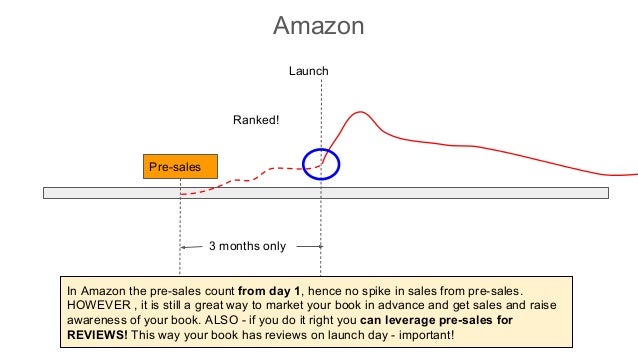
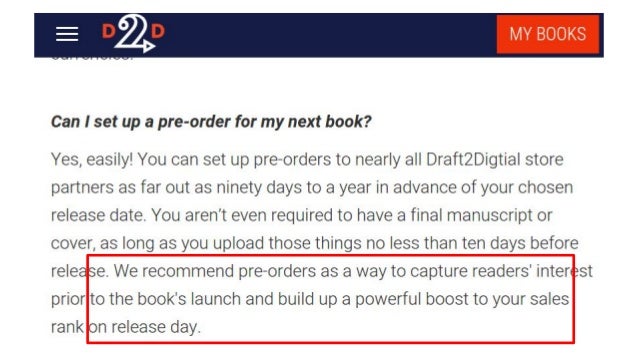
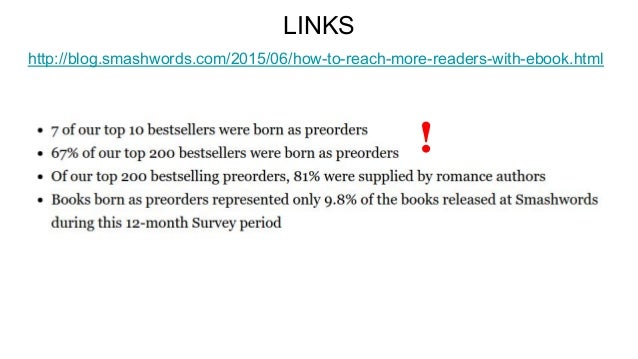
2. D2D and Smashwords Pre-sales Launch 3 months to 1 year (!) No rank! Why Pre-sell? Because those pre-sales count on launch day, and can spike your sales to the top of the bestseller and “what’s hot” categories in Smash,D2D, AND iTunes!
3. Amazon Pre-sales Launch 3 months only Ranked! In Amazon the pre-sales count from day 1, hence no spike in sales from pre-sales. HOWEVER , it is still a great way to market your book in advance and get sales and raise awareness of your book. ALSO - if you do it right you can leverage pre-sales for REVIEWS! This way your book has reviews on launch day - important!
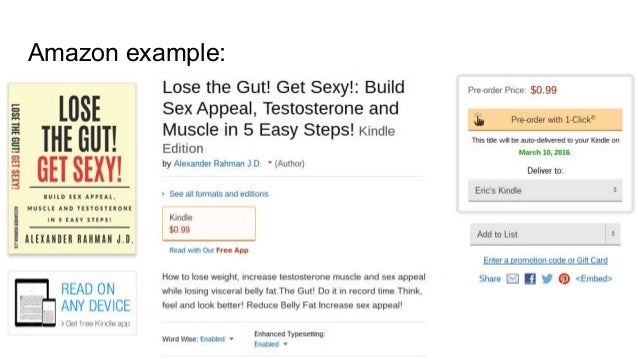
4. Amazon example:
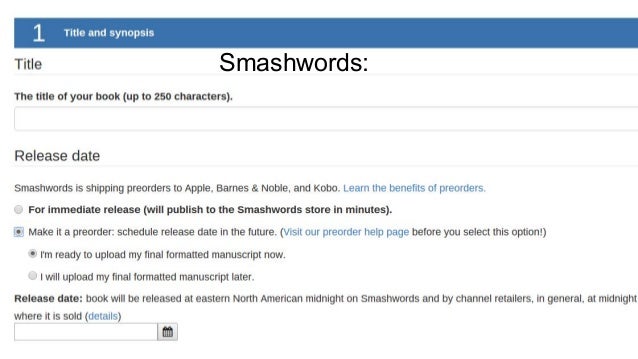
5. Smashwords:
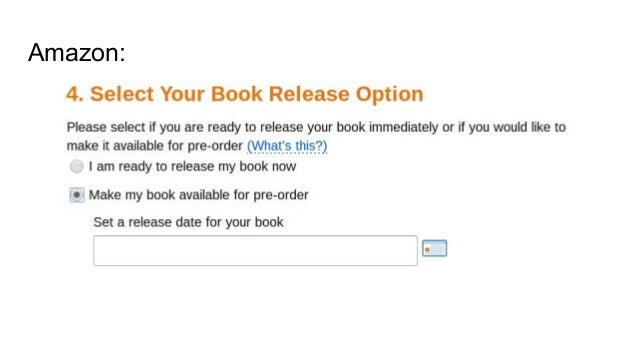
6. Amazon:
7. LINKS http://blog.smashwords.com/2015/06/how-to-reach-more-readers-with-ebook.html !
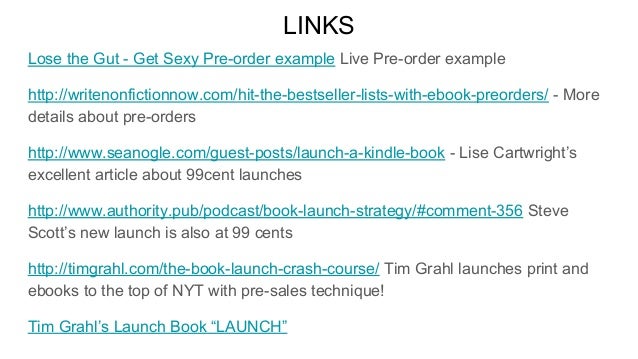
8. LINKS Lose the Gut - Get Sexy Pre-order example Live Pre-order example http://writenonfictionnow.com/hit-the-bestseller-lists-with-ebook-preorders/ - More details about pre-orders http://www.seanogle.com/guest-posts/launch-a-kindle-book - Lise Cartwright’s excellent article about 99cent launches http://www.authority.pub/podcast/book-launch-strategy/#comment-356 Steve Scott’s new launch is also at 99 cents http://timgrahl.com/the-book-launch-crash-course/ Tim Grahl launches print and ebooks to the top of NYT with pre-sales technique! Tim Grahl’s Launch Book “LAUNCH”
9. I hope this presentation adds value to your authoring process. I want YOU to finish your book. Come join in on the fun and learn how to Jump-Start your authoring career! JOIN ZBOOKS !


And here is a support answer from Draft2Digital themselves(!):

Eric,
We do not have a "store" like Smashwords so when we list for pre-orders it is at our Store sites. 
The vendors we use that accept Pre-orders are as follows:
Apple & Tolino - up to 1 year in advance
Kobo - up to 6 months in advance
B&N - up to 90 days in advance

If you've selected vendors that don't support preorders (Inktera, and Scribd), your book will go live on your selected release date.
Free pre-orders are not supported by any of our vendors.

Apple, and Kobo will generate a publicly available sample from whatever document you provide, so you should not upload a file if you do not want it shown to the public (an unedited file for example).

If your manuscript is not yet complete, you may set up a pre-order without a manuscript (or cover art). Please do not upload "placeholder" or "dummy" manuscripts as this will cause problems with your preorder and will likely result in the pre-order being cancelled. Placeholder cover art is okay.
In order to ensure that your release goes smoothly, the final manuscript MUST BE uploaded no later than 10 days prior to release. This is to ensure every vendor has time to review that file and to provide ample time to get any potential flags or errors reported by the vendor resolved before release.

Please be advised that changes (including changes to the release date) made within 3 business days of release may or may not be applied to your book prior to release due to certain review processes at our vendors.
You may adjust the release date of your book forward or backwards. However, if the book is a no-asset pre-order, moving the release date forward MUST allow ten days from the time the final file is submitted for the book to go through a full review process at our vendors.

Currently only Apple and Barnes and Noble provide pre-order estimates. Apple estimates are available daily and B&N estimates are delivered weekly.   This information is not yet available on your dashboard as these are estimates of the pre-order sales only.   We are looking to add this information on your dashboard in the future but at this time this information is not available.  You may contact us directly to get estimates by email or phone.

We hold all pre-order sales until the day of release and then they reflect those sales as release day sales, potentially bumping up an author’s book rank on release day. However, this does mean we do not see the pre-order totals until the day after release day.

Please let me know if you have further questions.
Best Regards,

Draft2Digital


Friday, July 24, 2015

The Difference Between Indie and Traditionally Published Authors

By Eric Z get more from him here SUBSCRIBE


Transcript:
  1. 1. The Publishing World is changing…
  2. 2. The Publishing World is changing… It‘s Over!
  3. 3. Of course, the old guard and Gatekeepers will tell You otherwise. Let‘s take a look… BULLSH*T!
  4. 4. Indie‘s OWN the Romance genre AND Sci-Fi!
  5. 5. INDIE‘S TAKE HOME MORE MONEY! • 20% of 15.99?** • 70% of 4.99? SIMPLE MATH! 3.198 4.193 !!!
  6. 6. **Typically, an author can expect to receive the following royalties: Hardback edition: 10% of the retail price on the first 5,000 copies; 12.5% for the next 5,000 copies sold, then 15% for all further copies sold. Paperback: 8% of retail price on the first 150,000 copies sold, then 10% thereafter.
  7. 7. Amazon „SWEETSPOT“ • 35% on .99 = .35 cents profit • 70% on 4.99 = 3.50 profit
  8. 8. What‘s the difference? The „big 5“
  9. 9. Indie‘s must do their own marketing!
  10. 10. Q: Uh-oh, oh-sh*t, I gotta learn marketing now???  A: YES, get over it, get on it, fail forward…
  11. 11. RULE # 1: Choose a profitable Niche Just google it – it‘s a no brainer.
  12. 12. RULE # 2: You may NOT work in a vacuum Your ROI will be directly proportional to the amount of people you get involved BEFORE launch.
  13. 13. RULE # 3: Validate your books BEFORE you write them. Heh? WTF is „validation“!?
  14. 14. Validation 101
  15. 15. Validation 101 – many methods, here are the top 3: 1. Make the cover first. 2. Show snippets of your work in forums. 3. Write blogs and collect emails.
  16. 16. Method 1 – Make the Cover First. 1. Make the cover first. 2. Post it in forums like the Kboards – Check the feedback 3. Upload it to Ratebookcover.com – Check the feedback 4. Send your winning book cover to your friends and fans and PRE-SELL the book. 5. Did people buy it or pre-order it? 6. Yes = Validated, No = forget it, go to new book or cover.
  17. 17. Method 2 – Post snippets of your work in forums.
  18. 18. BOOM! There it is! Notice he did this without ever mentioning Pre-orders! He just got their interest. Now he should send that person his paypal link and ask for a real pre-order! Just one post in a forum, no website, no cover, no anything! = BOOK Validated now – Write it!
  19. 19. Method 3 – Start Blogging and collect emails. 1. Start a blog for every book you want to write. 2. Write like crazy and post pics etc. 3. INSTALL an email collector + service on your blogs. (e.g.Mailchimp) 4. Make a lead magnet, e.g. a free chapter of your upcoming book. 5. Monitor them , the first one to collect X emails wins = validated! More info here:http://www.zbooks.co/2015/01/marketingmarketing marketing-let-me.html
  20. 20. My Book „Be Freud“ at Befreud.com keeps getting sign-ups, DAILY = Validated = Make the book!
  21. 21. Once you have validated a few books and gotten the hang of it you are „in production“:
  22. 22. Regardless of what system you choose, just remember: Do NOT work in a vaccuum. Go to forums like the Kboards and get involved. You are not alone!
  23. 23. • http://www.kboards.com/index.php/topic,218509.0/topicseen.html
  24. 24. And because I want you to succeed, I‘m going to give you all the materials you need to get started: Take note, this here Ebook template has been used to write several bestsellers!
  25. 25. My method is the simplest and easiest way to make an Ebook – period! So go to Zbooks.co and get all the materials you need to start your book empire…
  26. 26. Here‘s to YOUR success! -- Eric Z of Zbooks.co
  27. 27. Back-Up Slides
  28. 28. DO NOT DRM!


What do you want me to make next? Let me know!>>>https://zbooksco.typeform.com/to/NALmvc

Wednesday, July 22, 2015

Coming Soon -- The Complete Guide For Beginners

By Eric Z get more from him HERE

I have been listening to you my friends, and as we build books together, I have developed the 7 Day Challenge to cover all of your needs.
Not only does the 7 Day Challenge walk you through all of the resources, it also shows you how to:

  • market your book, 
  • make a sign-up page, 
  • optimize your book for sales, 
  • choose the right categories and keywords, 
  • much much more!

AND, if that isn't enough, we have a live comment system where you can get darned near 1:1 help from me.

See you on the inside!


This course is ridiculously priced, easily a $200 value, 7 days of instruction and valuable insider information - right now at the Introductory Price of only $7.00 !!!


JOIN


Would you like to make a print book instead?
  • Gotcha covered!

In this course you will learn
how to publish a print book
with
CreateSpace OR KDP print!

As in the 7 Day Challenge, this course is on its own dedicated website with an active comment system where you get 1:1 help from me!


Saturday, July 18, 2015

BIRTH of a Book 101 - Plus Free Title Checker/Creator

The very first steps - The Cover - The Title -  and Marketing!


Our Illustrious member Ben has a lawn care business. He wants to make a book to complement his business, AND teach teenagers how to start their own lawn care business, AND be profitable!


What’s the first step?
By now you should know — The Cover!
So I came up with this for him, just a first draft so he could see the direction we were going:
benbookCover1stdRAFT.png
Not bad, but the title is, uh...määäh!


There are basically two methods to create your new title:
1.) The Amazon method
2.) The old way – copy writing and optimizing

Amazon method:

1.) Go to amazon.com and start typing the first word of your title in the search field.
2.) Watch what pops up and note the “strings” of words that result.
3.) Use one of these strings in your title, or make the entire title a “string”.


This is a great method, that should help your book rank and trigger Amazon’s algorithms. But in this case, with a lawn care business guide, do we really want to make another “How To Guide”? This would make a really boring title, AND it would put the book in a highly competitive category. Instead there is a better way, the “old way”, and we can still put the keywords from the amazon method in our subtitle and description to make the book rank. This is important(!), you don’t have to use the amazon method for your title, but can move those keywords elsewhere, otherwise we are damned to come up with some very boring titles that everyone else already has.


The old way:

There are tons of books and blogs about copy writing techniques, I am going to give you the distilled version which I have gleaned from John Locke, Kay Tardiffe, Tim Ferris, Noah Kagan and Charlie Hoehn


1.) Your title should be 1-5 words, preferably 1-3.


2.) “YOU” and “YOUR” are very effective in a title; e.g. “You can cure…” or “You can make money doing ….”


3.) Brainstorm your title:  come up with at least 25 different titles. You may think this is too many, but it’s usually around the 25th or 30th title where your brain loosens up and you finally come up with the right one!


Then 4.) Ask yourself these questions (the same as in the tool):


1.) Is it memorable?
2.) Does it reflect the actual concept of the book?
3.) Will it target the right readers?
4.) Does it make you want to buy the book? – “oooh I gotta have that!”
5.) Would your friends pass this on to their friends?
6.) Is the title controversial? Does it spark a conversation?
7.) Is your title franchisable? –e.g. James Bond,1,2,3,4,…
8.) Is the domain name available? MybookTitle.com etc.
9.) Is somebody else already using your title? –argh!! (This is actually not a problem if it is a small title <2 words.)


Remember, you really gotta BRAINSTORM it, usually around the 30th title you will finally start thinking out of the box, and it will just come to you.


DO NOT WORK IN A VACUUM! Get your friends help and feedback.


There is nothing like feedback from your customers, so make sure you get feedback from people whose opinions you respect and that might actually buy the book or are interested in the subject.


This is what it looked like after we brainstormed and plugged it into the tool:
2015-03-15-201140_1680x1050_scrot.png
Then you answer the questions in the boxes on the left with “y” or “n”, the spreadsheet automatically changes the colors of the cells.
“Mow The Money In - Your First Teenage Business” won!
Much better than “How to start a teenage business guide” etc.
So I got to work on the cover again:


C:\Users\th94zt\Downloads\BOOKS\BENS-BOOK\benbookCover1.png
Not so bad, but I wanted the cover to “pop” more, here are the next versions:
BenScover1.png
C:\Users\th94zt\Downloads\BOOKS\BENS-BOOK\benbookCover5.png


After a second and third round with his friends and potential customers, we chose the title with the white lettering.


Then Ben printed this cover out and took it to the street!
He asked business owners and shop owners if he could put his flyer on their board, or stack it next to the cashier. He’s also putting it up in tennis courts where he has gotten a few customers already.


Remember this: Your marketing starts before you write ONE word!


Now Ben is on his way to a successful book launch, BUT, there is one or two more very important things he must do now:


COLLECT EMAILS!


The next step is a landing page for Ben’s book so he can collect those emails. Ben already has a business so he may be able to integrate his book into his business website. This is a very tricky thing now; what is better? Should he put it on the first page of his business website? Or should he make a separate landing page for the book alone? Well? What does contemporary internet wisdom say? — CHOOSE BOTH!


WHEN YOU CAN, CHOOSE BOTH — THEN TEST, TEST, TEST!


Ben is working on his websites right now, we will get back to you when he’s done. Also stay tuned for his book launch.


In the meantime, I want to give you this wonderful title creator/checking tool!
Here it is my friends, download it, make a copy of it in your google docs and brainstorm every title with your friends, and family, and most of all, your target customers! It only costs you an email:


I made this spreadsheet title checker/creator based on a magnificent post by Charlie Hoehn, it is linked in the top left box. Charlie, if you’re reading this — THANK YOU!


What do you want me to write/make next? Let me know >>> I will make it!